
Product · 19 October 2026 · 7 min read
Let an AI agent make music, art and 3D with Infinite's headless engine
Infinite's headless engine lets an AI agent such as Claude write a text patch, check it, listen to it and render music, pictures and 3D from the command line.
By Naman Soni
on this page
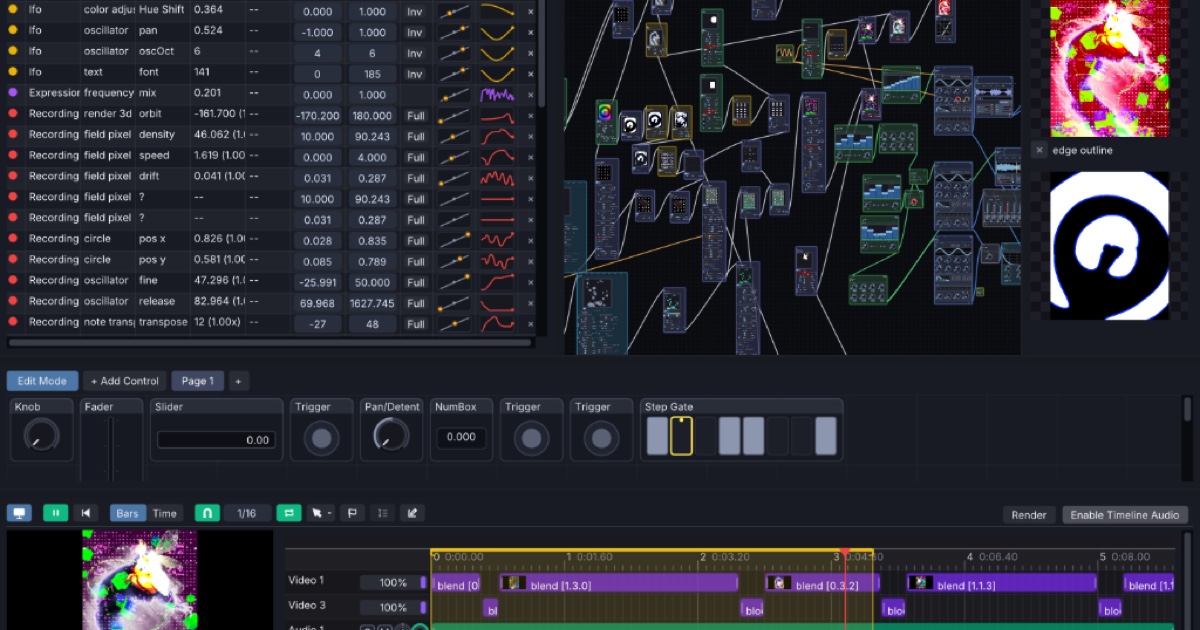
An AI agent that can run shell commands can make music, pictures and 3D with Infinite, because the engine runs headless. The executable inside the app is also a command-line tool. It reads a plain-text patch and writes stills, video and audio, with no window and no mouse. A patch is text, so an agent such as Claude can write it, check it, listen to it and fix it in a loop.
This post shows that loop, then three small patches: a sound, a picture and a 3D scene. It builds on the headless render walkthrough and the Headless User Guide.
Why a text patch suits an agent
Most creative tools hide their state behind a window. An agent can only guess at what a click did. An Infinite patch is different in four ways:
- It is text. A patch is a list of
node,cable,modandexprlines in a.inffile. An agent writes it the way it writes code, and it diffs cleanly in version control. - The engine explains itself.
Infinite --describe "<node type>"lists a node's controls with defaults, ranges and dropdown options, so the agent never has to guess a name or a range. - Errors are specific.
--validatereports every problem with a line number and a hint that names the nearest valid key. - Results are machine readable. The last line printed is one JSON object with
ok,files,warningsanderrors, and the exit code says whether the patch loaded, was refused or failed to render.
The output is also deterministic: the same patch gives the same frames and the same samples, so an agent can change one thing and trust that any difference came from that change.
The loop an agent follows
The Headless User Guide gives the order, and it works as a prompt for an agent as it stands:
- Describe. Ask the engine for the node's controls with
--describe. Do not guess. - Write the smallest patch that could work. Leave every control you do not change at its default.
- Validate with
--validateuntil the exit code is 0. - Explain with
--explain, which prints the graph that was actually built. A patch can validate and still be the wrong patch, so the agent compares this against what you asked for. - Look and listen.
--framedraws stills and--audio-summarydescribes the sound as numbers. - Fix one thing at a time and go back to step 3.
- Render the final file with
--render.
Infinite ships this loop as an agent skill, infinite-patch-authoring, written for AI coding agents. Point your agent at it and at the Headless User Guide, then describe what you want.
Music: notes, a synth and a measurement
This is the smallest audio patch that ships with Infinite. A random note generator plays a Wavetable synth into an Audio Out.
infinite-patch 1
node 1 Notes Random Note Generator
  id notes
end
node 2 Synths Wavetable
  id synth
end
node 3 Utility Audio Out
  id speakers
end
note synth 0 notes
aud speakers 0 synth
An agent cannot hear, so it measures. --audio-summary writes loudness, peaks, clipping, silence, a spectrum and a tempo guess to a JSON file, and --wav keeps the audio.
Infinite --validate music.inf
Infinite --audio-summary music.inf summary.json --wav music.wav --duration 8
Two warnings are worth teaching your agent to react to. W_SILENT means no sound reached an Audio Out, so check that notes reach the synth. W_CLIPPING means samples hit full scale, so lower a gain or add a Limiter. Add --stems id,id --stems-dir dir to write one WAV per named node, and --notes events.json to play your own note events into the patch. The agent can also ask --describe for the Synths and Audio Effects node types and build a fuller arrangement from them.
Art: a picture written as a formula
Pictures work the same way. The Field Pixel node draws an image from a formula, which suits an agent because it is short code with no hidden state. This patch ships as the Field starter template:
infinite-patch 1
node 1 Source FieldPixel
  id pix
  s code col = vec3(0.5 + 0.5 * sin(uv.x * 10.0 + t), 0.5 + 0.5 * sin(uv.y * 10.0 - t), 0.6);
end
node 2 Utility Output
  id out
end
cable out 0 pix
The agent looks before it commits to a video. A contact sheet costs seconds:
Infinite --frame art.inf 0,1,2,3 pics/ --contact-sheet sheet.pngThe result line includes frame_stats with brightness, the share of black and white pixels, and a histogram per frame, so the agent can notice a black or washed-out frame without opening the image. Field is the built-in language for shaders, geometry and audio kernels; the Field Language Manual explains it.
Sound that drives the picture
Because sound and pictures live in one graph, an agent can wire them together. Audio Analyze listens to a synth and outputs level, low, mid, high, onset and eight frequency bands, and any of those can drive a modulatable control. The Music and Image starter does it with two mod lines:
aud hear 0 synth
mod shape sizeX hear 0 0 1 0.5 0.12 0.4
mod shape sizeY hear 0 0 1 0.5 0.12 0.4
The last two numbers are absolute values the control sweeps between, not percentages. Put the Audio Analyze after your effects so the picture follows what you hear. The first steps tutorial builds this one by hand.
3D: a shape, a camera, a light and Render 3D
A 3D scene has four parts, and the starter template wires them like this:
infinite-patch 1
node 1 3D Torus Knot
  id knot
end
node 2 3D Camera
  id cam
  f orbitPerBeat 0.2
end
node 3 3D Light
  id sun
end
node 4 3D Render 3D
  id view
end
node 5 Utility Output
  id out
end
geo view 0 knot
geo view camera cam
geo view light_1 sun
cable out 0 view
Render a few stills, then a clip:
Infinite --frame scene.inf 0,2,4 pics/ --contact-sheet sheet.png
Infinite --render scene.inf scene.mp4 --duration 6 --fps 30
Give your agent the 3D rules from the guide. Primitives have fixed position, scale and rotation, so to animate a shape it should send it through a Transform node and modulate that. Infinite --explain scene.inf --all prints each piece's world bounding box, which tells the agent where things really are before it blames the lights. If the picture is black or faint, it should check the camera distance, the light intensities and the Render 3D ambient colour first.
What to ask for
Short, specific briefs work best. For example:
- "Write an Infinite patch with a slow Wavetable pad and a drum loop at 90 BPM. Render 16 seconds and keep it under clipping."
- "Make a Field Pixel patch that looks like slow ink in water. Show me a contact sheet first."
- "Build a 3D scene with a torus knot that rotates on the beat and glows with the music. Render a 10 second clip."
The agent loops through describe, write, validate, explain, look and listen, and hands back the patch plus the files. You can open the same .inf file in the app and keep working by hand, because it is the same engine.
Limits to know
- Patches that use a camera, microphone or MIDI device are refused headless with exit code 4. Use a file or a generator instead.
- Frames come from the real GPU pipeline, so the machine needs working OpenGL. On Linux, run every command as
xvfb-run -a Infinite .... - An agent can measure sound but not judge taste. Listen to the WAV and look at the sheet yourself before you ship anything.
- Infinite is young. Check any node an agent picks with
--describerather than trusting its memory of how the node works.
Try it
Infinite is free and open source (MIT) for macOS, Windows and Linux. Download it from infinitedevices.org, read the Headless User Guide, and give your agent the patch-authoring skill. The source is at github.com/n1m21n/Infinite.