
Creative
Generative visuals in live performance: audio, nodes and GPU
Build robust generative visuals for live performance with audio FFT analysis, GPU shaders, procedural geometry, and stable feedback loops in Infinite.
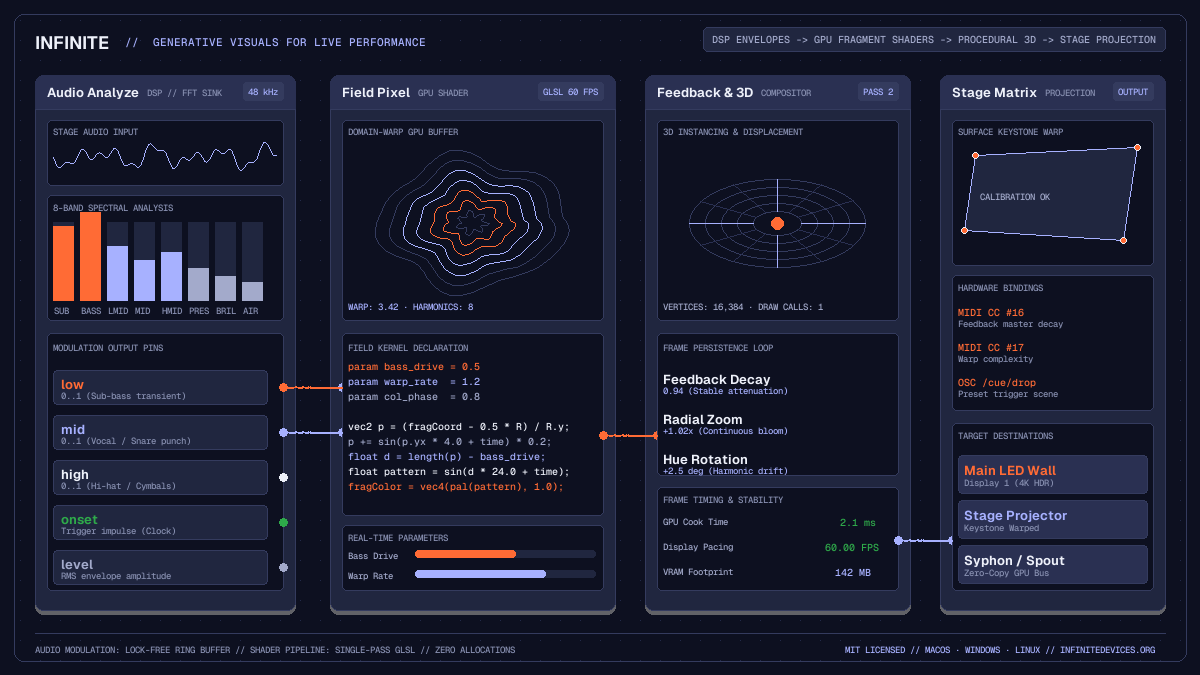
on this page

Designing generative visuals live performance systems requires balancing organic computational complexity against absolute stage reliability. Video loops pre-rendered to disk are predictable, but they cannot respond to improvisational tempo changes, unexpected beat drops, or the dynamic energy of a live crowd. Writing raw graphics code in standalone frameworks provides procedural freedom, but building custom audio routing, MIDI mapping, and projection calibration from scratch during show preparation introduces significant friction.
Infinite bridges this divide by providing a unified, node-based workstation where audio synthesis, digital signal processing, real-time GPU fragment shaders, and 3D procedural geometry execute within a single graph. Because audio and graphics share memory space, modulation runs without operating system inter-process latency.
This guide details the technical architecture needed to build robust generative stage visual rigs that respond accurately to incoming music while maintaining locked 60 fps rendering.
Latency budgets and audio-reactive signal chains
The primary failure mode of reactive stage visuals is phase latency: visual pulses hitting the projection screen after the audience has already heard and felt the acoustic transient through the sound system. In club environments and festival stages, human perception detects audiovisual offsets greater than 20 milliseconds as disconnected.
To maintain tight synchronisation, the signal pipeline must minimise buffer delays at every stage:
- Audio ingestion: Live sound enters through an
Audio Innode connected to the venue mixer booth monitor feed, or is generated internally using synthesiser nodes such asAnalogorSampler. - Frequency decomposition: The signal connects to an
Audio Analyzenode. Rather than relying on simple root-mean-square amplitude, this node computes an 8-band fast Fourier transform filterbank alongside dedicated transient onset detection. - Lock-free modulation transfer: Audio runs on real-time worker threads at 48 kHz in blocks of 128 or 256 samples (2.67 to 5.33 ms of latency). Visual render passes query analysis results through lock-free ring buffers immediately before cooking a frame, ensuring that graphics update within the same display refresh cycle.
The Audio Analyze node exposes specific pins designed for musical modulation:
low: Energy below 250 Hz, isolating sub-bass and kick drum attacks.mid: Frequencies between 250 Hz and 4 kHz, tracking synth stabs, snares, and vocal phrases.high: Frequencies above 4 kHz, capturing percussion sizzle and open hi-hats.onset: Single-frame impulse triggers generated by high-frequency spectral flux, suitable for resetting phase counters or switching visual states.
Raw FFT signals often produce harsh, jittery modulation. Routing low or mid through a Smooth node or a Range To Range node dampens jitter, converting spiky numbers into smooth, continuous envelope sweeps.
Real-time fragment shaders with Field Pixel
While pre-built filter nodes handle standard video adjustments, unique visual aesthetics often demand custom GPU algorithms: reaction-diffusion patterns, raymarched distance fields, gyroids, and recursive domain warping. In Infinite, performers write these routines directly on the canvas using the Field Pixel node.
Field compiles high-level mathematical expressions into native GLSL fragment shaders executing on the graphics processor. Controls declared with the param keyword expose animatable input pins on the node body, allowing live audio signals to modulate shader constants.
Here is a complete, stage-ready domain-warping shader kernel designed for the Field Pixel node:
// Declared modulation inputs exposed as node pins
param bass_drive  = 0.45;
param warp_speed  = 1.20;
param complexity  = 3.50;
param colour_drift = 0.80;

// Normalised canvas coordinates
vec2 uv = (fragCoord - 0.5 * resolution.xy) / resolution.y;

// Audio-reactive domain warping
vec2 q = uv;
q.x += sin(uv.y * complexity + time * warp_speed) * 0.25;
q.y += cos(uv.x * complexity + time * warp_speed) * 0.25;

// Distance estimation
float dist = length(q) - (bass_drive * 0.6);
float rings = sin(dist * 18.0 - time * 2.0);
float edge = smoothstep(0.02, 0.0, abs(rings));

// Procedural cosine colour palette
vec3 tint_a = vec3(0.08, 0.10, 0.20);
vec3 tint_b = vec3(0.65, 0.70, 0.95);
vec3 tint_c = vec3(1.00, 0.42, 0.21);
vec3 col = tint_a + tint_b * cos(6.28318 * (colour_drift * q.xyx + vec3(0.0, 0.33, 0.67)));
col += edge * tint_c;

fragColor = vec4(col, 1.0);
When patched, connecting Audio Analyze (low) to bass_drive expands the central geometric core on every kick drum strike, while Audio Analyze (high) wired to colour_drift cycles the colour palette on open hats. For an in-depth review of fragment shader techniques, explore the audio-reactive GLSL shaders guide.
Procedural geometry and 3D instancing
Two-dimensional pixel shaders gain substantial depth when combined with procedural 3D structures. Rather than importing rigid polygonal assets from external modelling software, generative stage visual sets often use mathematical primitives deformed in real time.
In Infinite, 3D pipelines assemble using modular geometry nodes:
- Primitive sources: Nodes such as
Cube,Sphere,Torus, orCylindergenerate parametric vertex meshes with configurable subdivisions. - Procedural replication: The
Arraynode duplicates geometry across three-dimensional Cartesian grids, concentric rings, or Fibonacci spirals without issuing multiple draw calls. - Real-time vertex deformation: The
Audio DisplacementandField Modifiernodes manipulate vertex positionsPand surface normalsNalong mathematical functions or audio waveforms before rasterisation. - Rendering: The
Render 3Dnode collects instances, evaluates a virtualCamera, applies lighting models, and outputs a 2D texture buffer into the compositing tree.
By driving the rotation angles of Render 3D with an LFO node and modulating mesh displacement with live audio frequencies, performers create evolving architectural forms that breathe in tempo with the performance.
Stable feedback loops for live performance
Optical feedback is a foundational technique of live visual art. By feeding a rendered frame back into the input of a compositing chain with subtle scale, rotation, and colour offsets, static shapes evolve into fluid, self-organising cellular structures.
However, unconstrained digital feedback loops quickly suffer from instability: values either blow out to peak white within seconds or fade out into complete blackness.
A dependable stage feedback network requires three explicit stages:
- Attenuation: Every iteration must decay slightly. A
Blendnode operating in Multiply or Screen mode, or anOpacitynode set to 0.92 to 0.96, prevents energy from accumulating beyond display limits. - Spatial transformation: A
Transformnode placed inside the loop introduces slight zoom (for example, 1.015x) or rotation (0.3 degrees). This pushes old frame content outward toward the display borders, creating tunnel or vortex motion. - Temporal persistence: A
Trailsnode preserves trailing light paths while dampening abrupt visual discontinuities.
Because Infinite manages texture buffers natively on the GPU, feedback loops execute without memory copy overhead between the graphics card and host CPU.
Stage control, MIDI mapping and multi-screen projection
A generative patch must remain steerable during a live show. Relying solely on automated sound analysis risks visual monotony across a ninety-minute set. Physical hardware control allows performers to introduce sudden breakdowns, adjust overall complexity, or transition between aesthetic themes.
Infinite supports direct hardware integration:
MIDI In: Binds physical knobs, faders, and rotary encoders to any parameter on the canvas. Assigning faders to feedback decay, shader warp frequency, and master brightness gives physical tactility to digital generative structures.OSC Receive: Accepts Open Sound Control network packets over UDP from external sequencing apps, mobile control interfaces, or digital audio workstations.Projection: The final output node provides four-corner perspective homography warping, keystoning, and grid-based mesh calibration for mapping angled projector outputs onto geometric stage surfaces.- Zero-copy interconnects: For multi-application stage configurations,
Syphon Out(on macOS) andSpout Out(on Windows) stream GPU textures directly to lighting servers, media software, or broadcasting rigs without dropping frames.
Production checklist for stage reliability
When performing in front of an audience, technical failures cannot be negotiated away. Preparing a generative patch for live performance requires strict verification:
- Headless validation: Test patch syntax and node integrity from the command line using
infinite --validate patch.inf. This verifies that all connections, modulation bindings, and shader kernels parse cleanly without syntax errors. - Fixed resolution budgets: Target 1920x1080 at 60 fps for standard projection systems. Avoid arbitrarily oversized framebuffers that consume excessive fill-rate bandwidth without visible audience benefit.
- Thermal headroom: Confirm that your graphics processor maintains sustained frame rates under warm stage conditions. Monitor cook times in the performance matrix; an efficient generative graph should complete its graphics pass in under 4 milliseconds per frame.
- Safety fallbacks: Always patch a master fader mapped to an auxiliary hardware slider that can fade the entire visual output to black or crossfade into an ambient background if an incoming booth audio cable is disconnected.
Where to go next
Generative visual systems reward ongoing experimentation and iteration. To explore practical working patches, download free example setups from the Infinite Library, or consult the Field language manual to begin authoring bespoke mathematical shaders. By combining real-time DSP analysis with GPU-accelerated node pipelines, you can build responsive, instrument-grade visual instruments tailored specifically for live performance.