
Creative
Embedding interactive audio-reactive WebGL visuals on any website
How to embed responsive, microphone-reactive 3D WebGL visualisers into portfolios, documentation, and blogs using self-contained HTML iframes.
on this page
Adding an interactive audio visualizer embed to a technical portfolio, documentation page, or creative release announcement often sounds simpler than it turns out to be. In practice, embedding real-time generative computer graphics on the web usually means pulling in large third-party runtime bundles, wrangling WebAudio permission policies, managing asset loading cascades, and debugging WebGL canvas resize glitches across mobile viewports.
Infinite approaches web graphics from a different perspective. Because Infinite compiles procedural fragment shaders, JavaScript sketches, and per-sample audio DSP nodes into self-contained formats, its web export pipeline generates standalone HTML widgets that require zero external dependencies, zero CDN requests, and zero script frameworks.
Here is how these embeds are structured, how the microphone reactivity works, and how you can place one on any page with a standard iframe.
The problem with traditional web audio visualisers
Most web visualisers rely on heavy JavaScript libraries such as Three.js, Babylon.js, or complex bundling setups. When embedded inside an article or project portfolio, these libraries create three distinct friction points:
- Payload weight and cold starts: Loading megabyte-scale runtime libraries introduces layout shifts, slow paint times, and stuttering initial frames.
- Audio context locking: Modern web browsers block audio playback and microphone capture until an explicit user interaction occurs. If an embedded canvas tries to initialise WebAudio automatically, the browser mutes or rejects the audio stream.
- Cross-origin security restrictions: When hosting visual widgets in iframes, microphone access requires explicit permission delegation via the
allow="microphone"attribute. Without this header, permission dialogues fail silently.
Infinite solves this by generating single-file HTML embeds where the entire WebGL vertex shader, fragment shader, audio analysis loop, and fallback UI live in under twelve kilobytes of plain text.
Anatomy of a self-contained WebGL widget
Every visual widget in the Infinite embeds gallery follows a consistent, accessible structure. The shell provides a responsive canvas, a glass-morphism microphone activation pill, and a brand badge linking back to the open-source workstation.
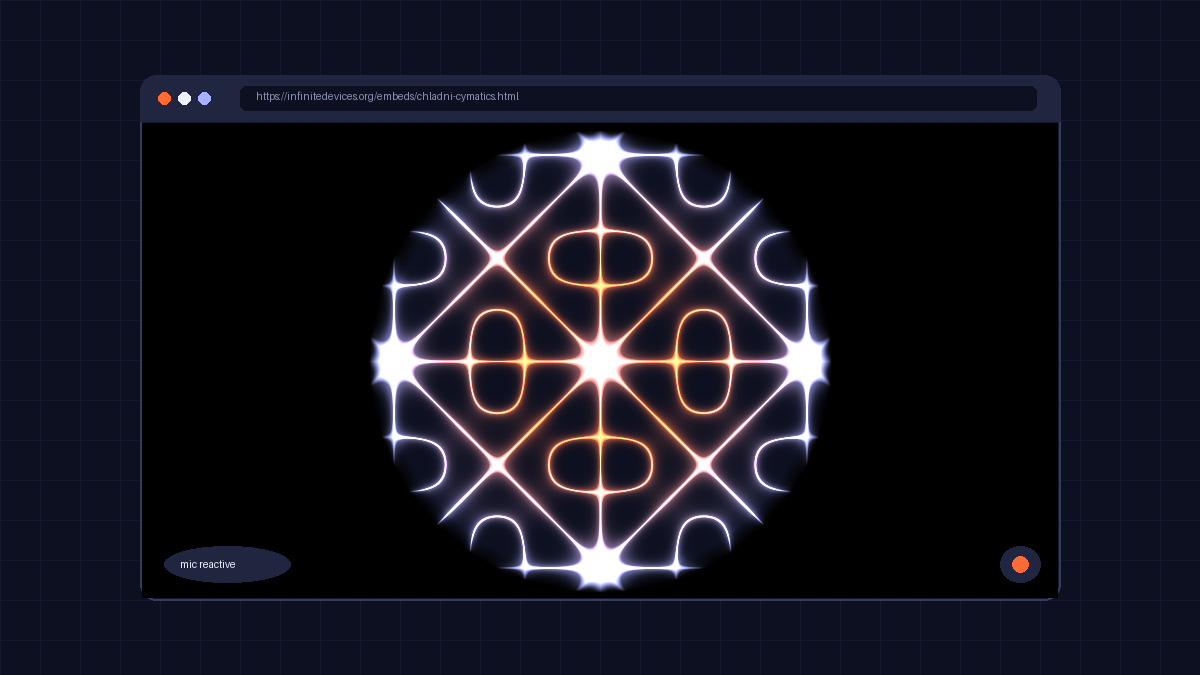
Here is the complete fragment shader logic used by the Chladni Cymatics embed, running procedural nodal mathematics in real time:
precision highp float;
uniform vec2 res;
uniform float t;
uniform float aspect;
uniform float audio_bass;
uniform float audio_mid;
uniform float audio_high;

void main() {
  vec2 uv = gl_FragCoord.xy / res.xy;
  vec2 p = vec2((uv.x - 0.5) * aspect, uv.y - 0.5) * 2.3;

  float pi = 3.14159265359;
  float n = 2.0 + floor(mod(t * 0.4 + audio_bass * 3.0, 5.0));
  float m = 3.0 + floor(mod(t * 0.25 + audio_mid * 4.0, 6.0));

  float w1 = sin(n * pi * p.x) * sin(m * pi * p.y);
  float w2 = sin(m * pi * p.x) * sin(n * pi * p.y);
  float chladni = abs(w1 - w2);

  float line = smoothstep(0.09 + audio_high * 0.06, 0.0, chladni);
  float glow = exp(-chladni * 3.5) * (0.35 + 0.65 * audio_mid);

  float r = length(p);
  float plate = smoothstep(1.15, 1.05, r);

  vec3 ember = vec3(1.0, 0.42, 0.21);
  vec3 signal = vec3(0.655, 0.694, 1.0);
  vec3 ground = vec3(0.082, 0.098, 0.188);

  vec3 patternCol = mix(signal, ember, sin(t * 0.5 + r * 4.0) * 0.5 + 0.5);
  vec3 col = ground + patternCol * (line * 1.6 + glow * 0.85);
  col *= plate;

  gl_FragColor = vec4(col, 1.0);
}
Notice that the shader does not query external textures or pre-computed lookup tables. The nodal lines, resonant harmonics, and radial falloff are derived purely from coordinate geometry and three normalised float inputs: audio_bass, audio_mid, and audio_high.
Capturing microphone input cleanly
To adhere to browser autoplay policies, the microphone analyser only initialises when the viewer clicks the microphone button. When permission is granted, a lightweight 64-bin FFT analyser extracts spectral energy across low, mid, and high frequency ranges:
let audioContext = null;
let analyser = null;
let freqData = null;

document.getElementById("btn-audio").addEventListener("click", async () => {
  if (!audioContext) {
    audioContext = new (window.AudioContext || window.webkitAudioContext)();
    try {
      const stream = await navigator.mediaDevices.getUserMedia({ audio: true });
      const source = audioContext.createMediaStreamSource(stream);
      analyser = audioContext.createAnalyser();
      analyser.fftSize = 64;
      source.connect(analyser);
      freqData = new Uint8Array(analyser.frequencyBinCount);
      document.getElementById("btn-audio").classList.add("on");
    } catch (e) {
      document.getElementById("btn-audio").classList.add("off");
    }
  }
});
If the viewer chooses not to enable the microphone, or if the page is viewed in an environment without audio hardware, the render loop falls back gracefully to synthetic sine oscillations. The animation remains lively and fluid under all circumstances.
Copy-paste embed snippet
To place an audio-reactive visualiser on any website, copy the canonical snippet below into your HTML. The container uses a standard responsive 16:9 aspect ratio and delegates microphone access:
<figure style="margin:0;width:100%;max-width:720px">
  <iframe
    src="https://infinitedevices.org/embeds/chladni-cymatics.html"
    title="Chladni Cymatics: audio-reactive visual by Naman Soni (Infinite)"
    width="100%"
    height="400"
    loading="lazy"
    allow="microphone"
    style="border:0;border-radius:16px;display:block;aspect-ratio:16/9;height:auto">
  </iframe>
  <figcaption style="font:12px/1.4 system-ui,sans-serif;text-align:right;margin-top:6px;opacity:.75">
    Made in <a href="https://infinitedevices.org/" target="_blank" rel="noopener" style="color:inherit">Infinite</a>, by Naman Soni
  </figcaption>
</figure>
You can choose from seventeen distinct generative visuals in the Infinite embeds collection, ranging from cybernetic perspective tunnels and iridescent refraction spheres to fractal flames and kaleidoscope mirrors.
If you want to edit the underlying math or build your own custom visualisers from scratch, you can download the raw .field device files from the Infinite Library and open them directly on the Infinite node canvas.