
Product
Field Patcher: a visual DSP and shader patcher for Field
Field Patcher is a docked visual DSP and shader patcher in Infinite, keeping boxes, wires, and Field code in two-way sync for audio, shaders, 3D, and notes.
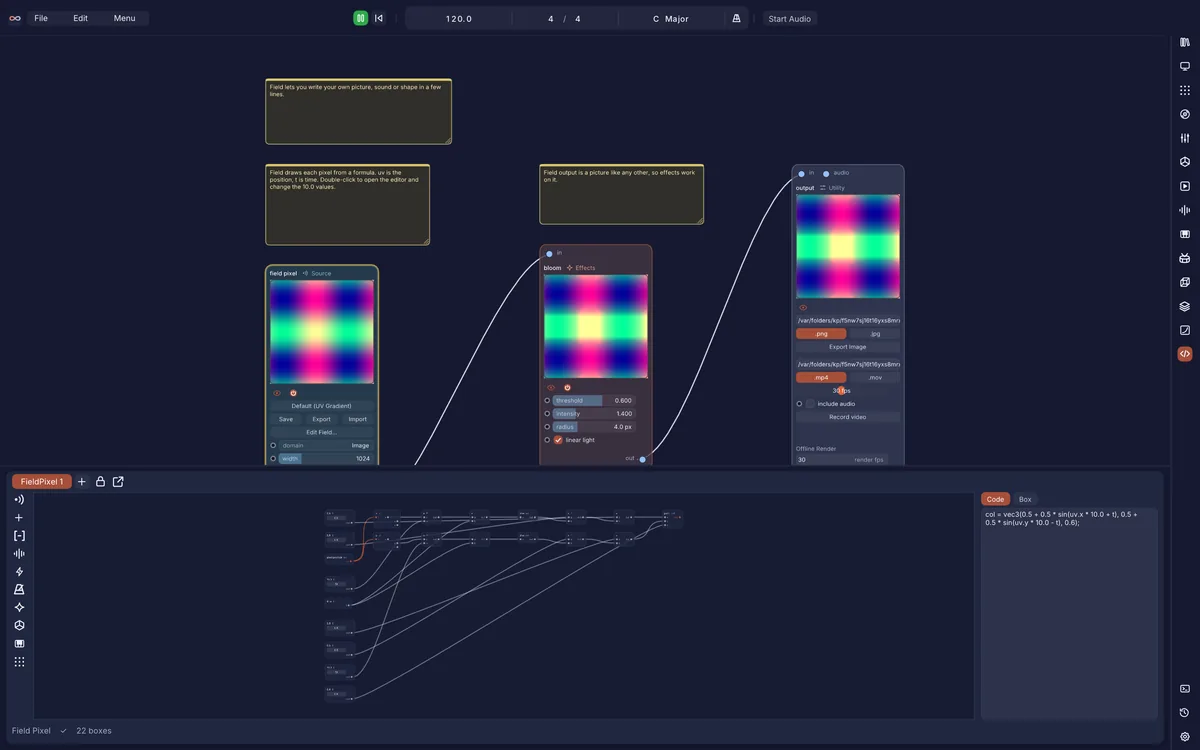
on this page
Writing audio DSP, shaders, and procedural geometry by hand is fast when you already know the exact formula, but exploratory patching often feels smoother when you can wire signals together visually. In Infinite, Field Patcher bridges both workflows as a docked, Max-style visual DSP and shader patcher built directly on top of the Field language.
Press Shift+F (or click Boxes on any supported Field node) to open Field Patcher at the bottom or top of the workspace. Instead of maintaining a separate proprietary graph format, every box and wire compiles straight into standard Field source code, while any Field code you type parses straight back into boxes.
Supported Field host nodes
Field Patcher attaches directly to the five core Field node implementations in Infinite, covering six node roles in the patch canvas:
| Node | Domain | Typical use |
|---|---|---|
| Field Notes | transport / sample | Generative melodies, Euclidean rhythms, and optional publish modulation |
| Field Primitive | element | Procedural 3D point clouds, spirals, lattices, and wave grids |
| Field Modulator | element (Value mode) | Custom LFOs, pulse trains, and CV sources via publish |
| Field Modifier | element / GPU points | Per-vertex mesh and point-cloud deformation |
| Field Pixel | pixel (GLSL) | Real-time fragment shaders and feedback textures |
| Field Effect | sample (audio DSP) | Per-sample waveshapers, filters, tremolos, and bit crushers |
Clicking a supported node on the main canvas brings its tab to the front automatically, unless you right-click a page chip to pin it in place.
Single source of truth and two-way sync
A common pitfall in dual code-and-node editors is drift between the visual graph and the underlying text. Field Patcher avoids that by treating the node's Field code as the single source of truth.
Whenever you connect a wire, drag a parameter number, or delete a box, the editor runs BoxGraph -> Field code generation in topological dependency order (preserving original statement order on ties) and pushes the result to the node as a single patch undo step. Layout coordinates, pan and zoom state, and named or folded groups are stored right at the top of the script inside a # @boxes v1 ... comment header:
# @boxes v1 view 0,0,1 | b1 40,80 | b2 240,80
x = in * 2.5
out = x / (1 + abs(x))
On the right-hand side of the panel, the Code and Box tabs stay in two-way sync. You can switch to Code to type or paste a kernel expression directly, or switch to Box to inspect a selected box's inlets and values. If a construct cannot yet be decomposed into dedicated boxes, Field Patcher keeps it intact as a raw code box so handwritten logic is never discarded when opened visually.
Better still, a syntax or compile typo during a live session never cuts off sound or picture. When compilation fails, the node keeps running its last good program while the footer reports last good alongside the exact error message until you fix the wire or line.
Ten box families and typed wires
Down the left edge of Field Patcher sits a rail grouping boxes into ten families:
- Sources: constants,
paramknobs,ttime,srsample rate, and domain inputs - Arithmetic: basic maths, vectors, and expressions
- Range:
clamp, remapping,smoothstep,fract, andfloor - Waves:
sin,cos, phasors, and oscillator building blocks - Logic: comparisons, switches, and conditional routing
- Time & memory:
statecells for filters, counters, and accumulators - Random:
rand()noise and stochastic triggers - Geometry:
vec2,vec3,length, and point attributes such asPanduv - Music:
tick(),deg()scale degrees, andnote()event emission - Inlets / outlets:
in,out,col,P,publish, and parameter pins
Right-clicking empty canvas or dragging a wire into space opens a fuzzy search picker filtered to boxes the active host node can actually execute; unsupported boxes are shown greyed out. To make signal flow readable at a glance, wires and pins carry distinct colours and glyphs by kind: Number (─), Bool (◉), animated Pulse (●), Note (♪), and PerPoint / Vec3 (✦).
Twenty built-in starters and scratch pages
You do not need to wire a blank canvas from scratch to test an idea. Field Patcher ships with 20 built-in starters (available from the template library), four for each main domain:
- Primitive:
Spiral,Sphere shell,Wave grid,Lissajous - Modulator:
Slow LFO,Triangle LFO,Pulse train,Skipping beat - Notes:
Melody from counting,Arpeggio,Bass pulse,Rising scale - Pixel:
Gradient,Rings,Stripes,Plasma - Effect:
Soft drive,Tremolo,Smoother,Bit crush
Opening a starter or clicking + creates a scratch page marked with ◌ in the page bar. Scratch pages belong to no canvas node yet, letting you prototype freely without cluttering the main graph. They are saved directly inside .inf patch files as fieldpage lines, so unfinished ideas survive closing and reopening a project. Once a scratch page has at least one outlet, the footer shows an export button (⤓) that turns the page into a real Field Notes, Field Primitive, Field Modulator, Field Pixel, or Field Effect node on the main canvas.
To explore how these nodes connect with audio routing, modulation matrices, and 3D renderers, browse the full Infinite node library, see workflows on the creative coders page, or inspect the engine architecture on the developers page.
Honest limits
Field Patcher covers the core day-to-day Field hosts, but a few boundaries are worth knowing up front:
- Not every Field node has a box view yet:
Field Synth,Field Graph, andSpectral Fieldare not currently Field Patcher hosts and still use the standard code editor. - Fallback to raw code boxes: advanced control flow or language expressions without a matching box specification stay inside inline
codeboxes rather than breaking into sub-nodes. - Session-only page tab order: while edits to a node's boxes and code register as patch undo steps and scratch pages save into
.inffiles viafieldpage, tab ordering and page management actions are session-only rather than undoable. - Early desktop focus: Infinite is a young project with no AAX plugin build, and headless execution refuses hardware audio and MIDI inputs.