
Creative
Image to sound: real-time spectrogram additive synthesis
How to turn live shaders, drawings, and textures into polyphonic sound in real time using Infinite's Spectral Synth additive partial bank.
on this page
Turning an image directly into sound is one of the oldest ideas in electronic music, stretching back to optical soundtracks on film and late-1990s spectrogram resynthesis tools like MetaSynth. Most implementations treat the image as a static file: you paint a bitmap offline, wait for an inverse FFT or additive render pass, and audition the resulting audio clip.
In Infinite, the Spectral Synth node runs that pipeline live on the audio thread. Any 2D texture on the node canvas, whether a procedural Noise field, a Sketch drawing, a Reaction Diffusion simulation, or an Image Source file, patches straight into Spectral Synth and is resynthesised in real time through a bank of up to 256 sine partials.
Here is how the pixel-to-partial engine works under the hood, how its five frequency scales and four colour modes shape the timbre, and how to wire a live audiovisual patch without leaving a single graph.

How spectrogram additive synthesis works
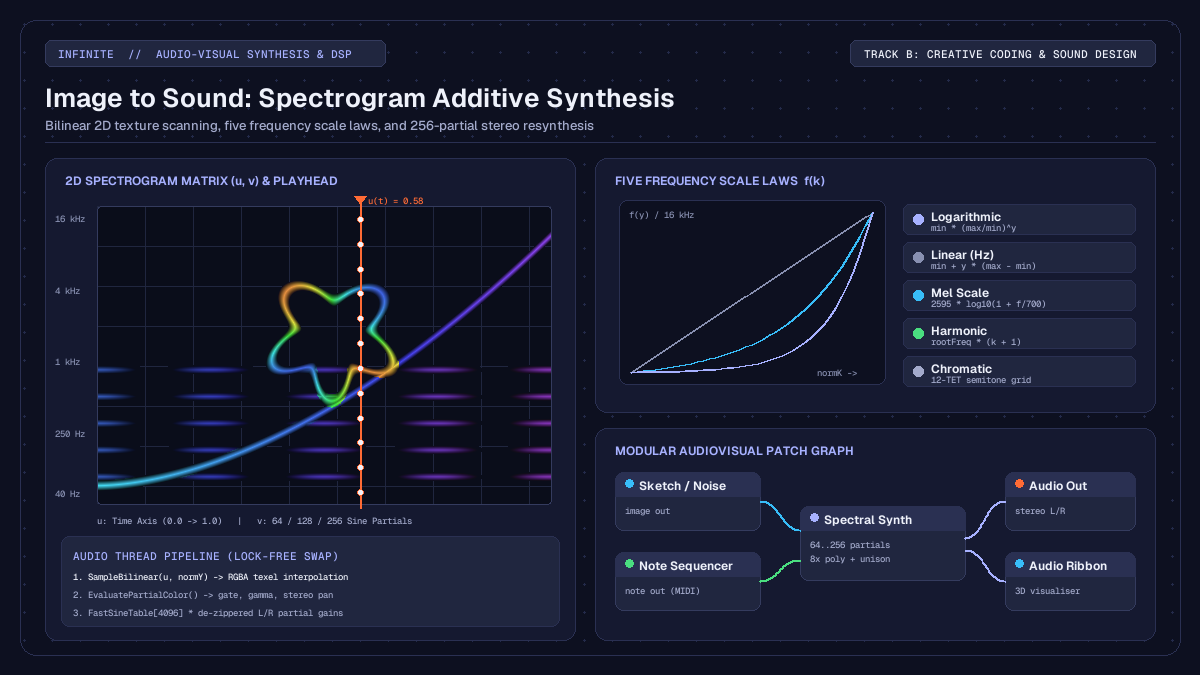
Spectral Synth treats its incoming texture as a normalised time-frequency matrix SpectrogramMatrix over (u, v) in [0, 1] x [0, 1]:
- Horizontal axis (
u): Time or scan playhead position from left (0.0) to right (1.0). - Vertical axis (
v): Frequency bin index from bottom (0.0, lowest frequency) to top (1.0, highest frequency).
At each audio block, the playhead advances along u according to the selected scan mode: Loop (0->1), Ping-Pong, One-Shot, Free-Run Hz, BPM Sync, or Manual Scrub. For each active partial k in 0 .. N - 1 (where N is 64 Partials, 128 Partials, or 256 Partials), the engine samples the texture at (u, k / (N - 1)) using bilinear interpolation across the four surrounding RGBA texels.
Bilinear filtering matters more than it first appears. Without it, a slowly moving playhead steps abruptly from column to column, creating zipper noise and step discontinuities in partial amplitudes. Combined with sample-accurate linear amplitude de-zippering on the audio thread and a 4096-point interpolated FastSineTable, the partial bank sweeps smoothly across gradients and sharp geometric edges alike.
Texture updates from the GPU side are handed off to the audio thread through a lock-free matrix slot (SwapIn()), so editing a shader or animating a Sketch node never blocks the real-time audio callback.
Five frequency scale mappings
A raw pixel row normK = k / (N - 1) has no intrinsic pitch until it is mapped onto Hertz. Spectral Synth provides five distinct frequency scale laws between minFreq (default 40 Hz) and maxFreq (default 16000 Hz):
- Logarithmic (Musical): Maps vertical position exponentially via
f(y) = minFreq * (maxFreq / minFreq)^y. Equal vertical distances correspond to equal musical intervals (octaves), making diagonal lines sound like smooth portamento glides. - Linear (Hz): Spaces partials uniformly across Hertz (
minFreq + y * (maxFreq - minFreq)). Horizontal lines above the fundamental produce inharmonic bell-like spectra because equal-Hz spacing compresses upper octaves into the top of the image. - Harmonic Series: Ignores
minFreqandmaxFreqin favour of integer multiples ofrootFreq(default261.63 Hz):f(k) = rootFreq * (k + 1). Any vertical column of pixels locks cleanly to a harmonic series, turning arbitrary textures into rich organ and vocal-like timbres. - Mel Scale: Distributes partials linearly in perceptual Mel space (
Mel = 2595 * log10(1 + f / 700)), giving finer resolution in the speech and midrange bands while remaining smooth across the spectrum. - Chromatic (12-TET): Quantises each partial row to the nearest 12-tone equal-tempered semitone across
log2(maxFreq / minFreq)octaves. Drawing scattered dots or noise creates sparkling quantized arpeggios and micro-clusters rather than continuous smears.
Colour-to-pan and image conditioning
Before converting a pixel into oscillator gain, Spectral Synth passes the sampled RGBA value through four conditioning controls:
threshold(0.0to0.5): Acts as a spectral noise gate. Pixels whose perceived luminance (0.299 * R + 0.587 * G + 0.114 * B, multiplied by alpha) falls belowthresholdare silenced completely, saving headroom and removing background haze.contrast(0.2to4.0): Applies a gamma power curveluma^contrastabove the threshold, sharpening bright strokes against dark backgrounds or compressing subtle textures into dense pads.brightness(0.0to3.0): Scales the resulting partial gain before stereo distribution.invert: Flips luminance (1.0 - luma), turning black-on-white drawings or dark silhouettes into bright harmonic walls.
Once conditioned, the pixel's RGB channels determine stereo placement through one of four colour modes:
Luma (Mono): Sums luminance equally to the centre.Hue -> Stereo Pan: Extracts HSV hue in[0, 1]and maps it linearly to equal-power stereo pan[-1, +1]. Warm reds sit left, greens sit near centre, and blues/violets spread right.RGB Split (L/R/Shimmer): Routes the red channel strictly to the left output, green strictly to the right output, and blends blue equally across both channels.Spectral Bands: Uses red-minus-green imbalance ((r - g) * 0.8) for stereo width while preserving overall luminance balance.
Polyphonic playback and modulation
Unlike an offline spectrogram player, Spectral Synth accepts a note cable from a Note Sequencer or MIDI controller with up to 8 polyphonic voices. Each voice transposes the entire partial bank relative to rootFreq, with optional octave (+/- 4), semi (+/- 12), fine (+/- 50 cents), and glide portamento.
When perVoiceScan is enabled, each incoming note retriggers its own independent playhead at u = 0 instead of sharing a single global cursor. Combined with unison (1 to 8 detuned voices per note), detune, stereoWidth, a built-in resonant filterType stage (12/24/36 dB low-pass, high-pass, band-pass, and notch modes with drive), and an ADSR amplitude envelope, a single black-and-white geometric pattern behaves like a full polyphonic synthesiser.
Patching a live audiovisual feedback loop
Because every node in Infinite shares the same graph, you can feed live procedural visuals into Spectral Synth and send the resulting audio straight back into the visual domain:
- Visual source: Add a
SketchorReaction Diffusionnode and draw slow-evolving organic curves or high-contrast bands. - Spectral resynthesis: Patch its image output into the
imageinput ofSpectral Synth. SetpartialsChoiceto128 Partials,freqScaletoHarmonic SeriesorChromatic (12-TET),colorModetoHue -> Stereo Pan, andscanModetoBPM Sync. - Note driving: Connect a
Note Sequencerinto thenoteinput ofSpectral Synth, and enableperVoiceScanso each chord step sweeps the texture from the left edge. - Audio output and visualiser: Route
Spectral SynthtoAudio Out, and tap the same audio cable intoAudio TextureorAudio Ribbonto display the live waveform and spectrum alongside the source image.
For related real-time synthesis architectures in Infinite, see our deep dive on wave terrain synthesis and browse ready-to-open patches in the Infinite Library.
Honest limits and next steps
Infinite is a young project, and running 256 sine partials across 8 polyphonic voices with 8x unison multiplies quickly on CPU-constrained laptops. When layering multiple Spectral Synth instances, dropping to 64 Partials or 128 Partials with unison at 1 or 2 keeps audio callbacks well within budget. Headless rendering and CLI automation also refuse live hardware audio/video inputs by design, so automated batch runs should use procedural sources like Noise, FieldPixel, or Image Source.
If you want to experiment immediately, drop a Noise node into Spectral Synth, raise threshold to 0.15, switch the scale to Chromatic (12-TET), and modulate position in Manual Scrub mode with a slow LFO.