
Notes node
Velocity Curve
Reshapes how hard you hit the keys maps to output velocity, using a single curve exponent — below 1 boosts soft hits, above 1 favors hard hits.
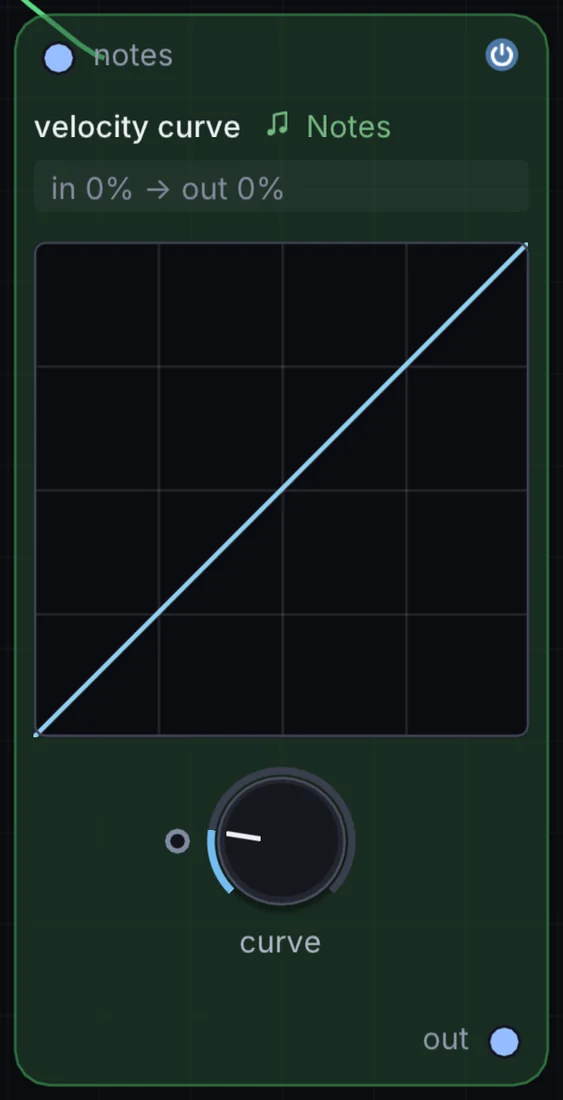
What it does
Velocity Curve is a note node: it makes, filters or changes notes before a synth plays them. It takes notes in and gives notes out.
Try it
Set the curve well below 1 to make a light, breathy playing style trigger notes at near-full velocity.
MIDI NotesVelocity CurveSampler
Inputs and outputs
Inputs
- notes notes
Outputs
- notes out
Controls
Every control with a range can be driven by a modulator, a note, an audio level or a sketch.
| Control | Range or options | Default |
|---|---|---|
| curve | 0.25 to 4 | 1 |
Example patch
This patch wires Velocity Curve to what it needs and shows the result. Download it, then use File, Open in Infinite, or read it here: it is plain text.
infinite-patch 1
rev 2
# Velocity Curve: a starting patch for the Velocity Curve node
node 1 Notes Velocity Curve
  id node
  pos 520 300
end
node 2 Notes Random Note Generator
  id in0
  pos 0 300
end
node 3 Synths Analog
  id voice
  pos 1080 300
end
node 4 Utility Audio Out
  id speakers
  pos 1640 300
end
note node 0 in0
note voice 0 node
aud speakers 0 voice