
Creative
Lock-free audio visualisers: GPU textures, ribbons, and 3D meshes
How Infinite's audio visualiser DSP bridges lock-free MeterRing buffers to GL_RGBA8 textures, 8-band spectral ramps, 3D ribbons, and mesh displacement.
on this page
Most audio visualisers live in one of two silos. Either they are baked into a single DAW window as a fixed 2D oscilloscope, or they sit in a separate graphics environment that relies on OSC, MIDI, or virtual loopback devices to guess what the audio engine is doing. Recent open-source discussions, from native tempo-synced oscilloscopes in modular DAWs like Nota to interactive DSP explorables and audio-reactive shader pipelines on Hacker News and GitHub, keep circling the same engineering problem: how to turn live audio buffers into GPU textures and 3D geometry without dropping audio callbacks or stalling the render loop.
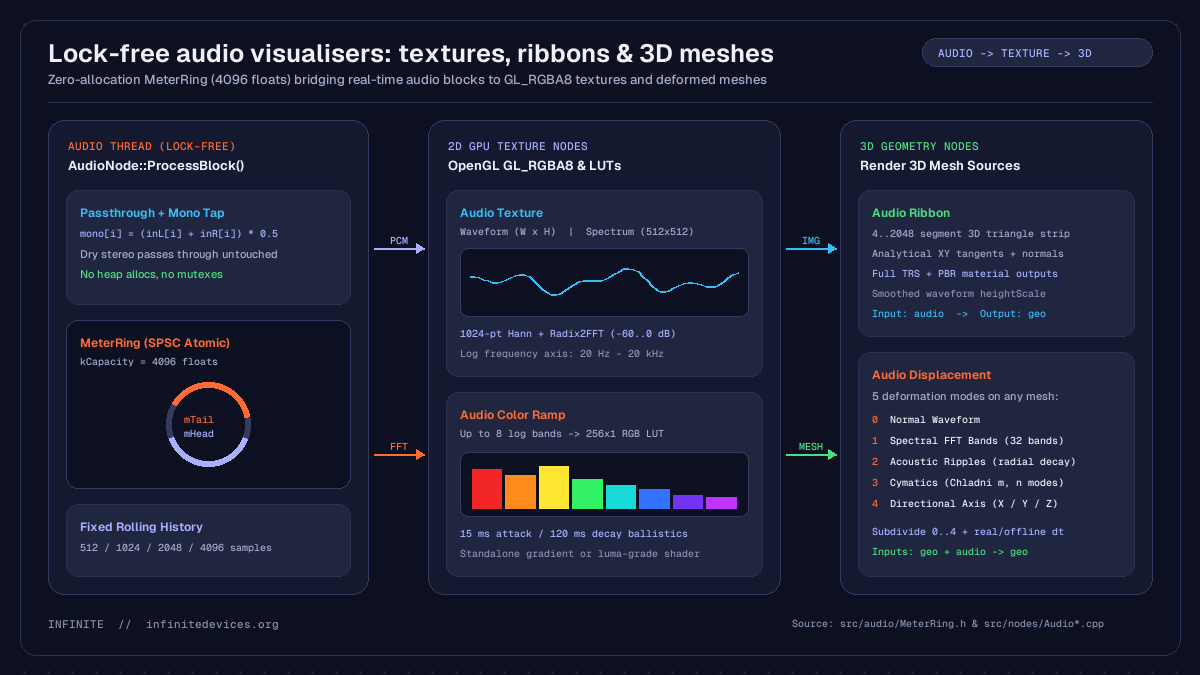
In Infinite, audio synthesis, 2D compositing, and 3D geometry share a single node graph. Four dedicated nodes bridge the audio thread and the graphics thread through lock-free ring buffers: Audio Texture, Audio Color Ramp, Audio Ribbon, and Audio Displacement.

Lock-free audio capture with MeterRing
Every audio-to-visual node in Infinite follows a two-object split. The main-thread INode owns OpenGL textures, meshes, and UI parameters, while a lightweight AudioNode sink runs inside the real-time audio graph.
Inside ProcessBlock(), the audio sink sums incoming stereo channels to mono (L + R) * 0.5f, passes the dry stereo signal straight through to its output buffer, and pushes the mono samples into a MeterRing (kCapacity = 4096 floats). Because MeterRing is a single-producer, single-consumer atomic ring buffer (mHead and mTail indices), the audio thread never allocates memory, never takes a mutex, and never waits on OpenGL or mesh rebuilds.
On the visual side, CookIfNeeded(int frameId) drains whatever new samples arrived since the previous frame and shifts them into a fixed-length rolling history (512, 1024, 2048, or 4096 samples). Keeping the history buffer at a fixed length avoids frame-to-frame jitter in FFT bin alignment or ribbon vertex mapping when the audio block size and display refresh rate do not divide evenly.
Turning waveforms and spectra into GPU images with Audio Texture
Audio Texture (AudioTextureNode in the Source palette) converts a live audio cable directly into a 2D GL_RGBA8 OpenGL texture so any downstream compositing or distortion node can treat sound as pixels:
- Waveform mode: Reads
512,1024,2048, or4096samples, appliesgainand one-pole temporalsmoothing(0.0to0.99), normalises[-1, 1]to[0, 1], and writes the trace across a squareW x Htexture. - Spectrum mode: Applies a 1024-point Hann window and runs
WaveTerrainDsp::Radix2FFTto extract 512 frequency bins. Magnitudes are log-compressed to a-60 dBto0 dBrange before smoothing so sparse harmonic sources such as wavetables remain legible instead of disappearing into black. - Logarithmic frequency mapping: Rather than packing bins linearly, Spectrum mode samples across
20 Hzto20 kHzlogarithmically (20 * 1000^pos), spreading bass and mid harmonics evenly across the texture width.
Because the output is a standard image texture, you can wire Audio Texture straight into feedback loops, displacement maps, or custom Field language pixel kernels.
Eight-band spectral grading with Audio Color Ramp
Audio Color Ramp (AudioColorRampNode in the Compositing palette) takes the same 1024-point Hann-windowed FFT and splits the 20 Hz to 20 kHz spectrum into up to kMaxBands = 8 user-adjustable frequency bands. Each band accumulates bin magnitudes, applies a per-band gain and asymmetric attack/decay envelope (15 ms attack, 120 ms decay), and updates a 256 x 1 RGB lookup table (kLutSize = 256).
It runs in three modes (Intensity Glow, Band Expansion, and Continuous Spectrum) with Linear, Constant, or Smooth interpolation. With no image patched into its img slot, it outputs the live gradient directly; with an image connected, a GLSL fragment shader grades the incoming luminance (dot(rgb, vec3(0.299, 0.587, 0.114))) through the audio-driven LUT.
Extruding waveforms and modal patterns in 3D
For 3D scenes rendered through Render 3D, two geometry nodes consume audio directly on dedicated pins:
- Audio Ribbon (
AudioRibbonNode): Extrudes a 1024-sample smoothed waveform into a 3D triangle strip (4to2048segments) with analytical XY tangents and normals,widthandheightScalecontrols, full TRS transforms, and PBR material properties (metallic,roughness,emission,ior). - Audio Displacement (
AudioDisplacementNode): Deforms any upstreamIGeometrySourcemesh (with optional real-time subdivision from0to4levels) across five physical modes:Normal Waveform,Spectral FFT Bands(32 log-spaced bands),Acoustic Ripples(radial damped waves),Cymatics (Chladni)standing-wave nodal patterns driven by integer mode numberschladniMandchladniN, andDirectional Axis.
In Audio Displacement, attack and decay ballistics step using real elapsed wall-clock time during live playback, and switch to Transport::Instance().Seconds() in offline render mode so two deterministic exports produce the exact same geometry.
Honest limits of the current implementation
- Eight-bit texture precision:
Audio Texturecurrently uploadsGL_RGBA8bytes rather than32-bitfloating-point textures, which quantises subtle sub--60 dBspectral detail. - Assumed 44.1 kHz bin mapping: Both
Audio Texture(Spectrum mode) andAudio Color Rampcurrently compute bin frequencies using44100.0fwhen mapping to20 Hzto20 kHz, so bin-to-frequency labels shift slightly at48 kHzor96 kHzinterfaces. - CPU mesh deformation:
Audio Displacementevaluates vertex offsets on the CPU before uploading theMesh; combining highsubdividelevels (3or4) with dense imported models will reduce viewport frame rate. - Headless capture: Live hardware audio inputs are refused in headless CLI renders; automated renders should feed a synthesiser or file source node instead.
You can browse every audio and geometry node on the Infinite node library, or see how custom per-sample audio and pixel kernels fit into the same graph in our Field language guide.