
Utility node
Audio Meter
A stereo level meter with separate left and right bars on a -60 to +3 dBFS scale. Each bar shows the average level (solid) inside the peaks (faint), with a peak-hold line and the loudest peak as a number on top that turns red at 0 dBFS. Audio passes through unchanged, and it measures whatever it is patched to even with its output unconnected, so it works as a tap on any cable.
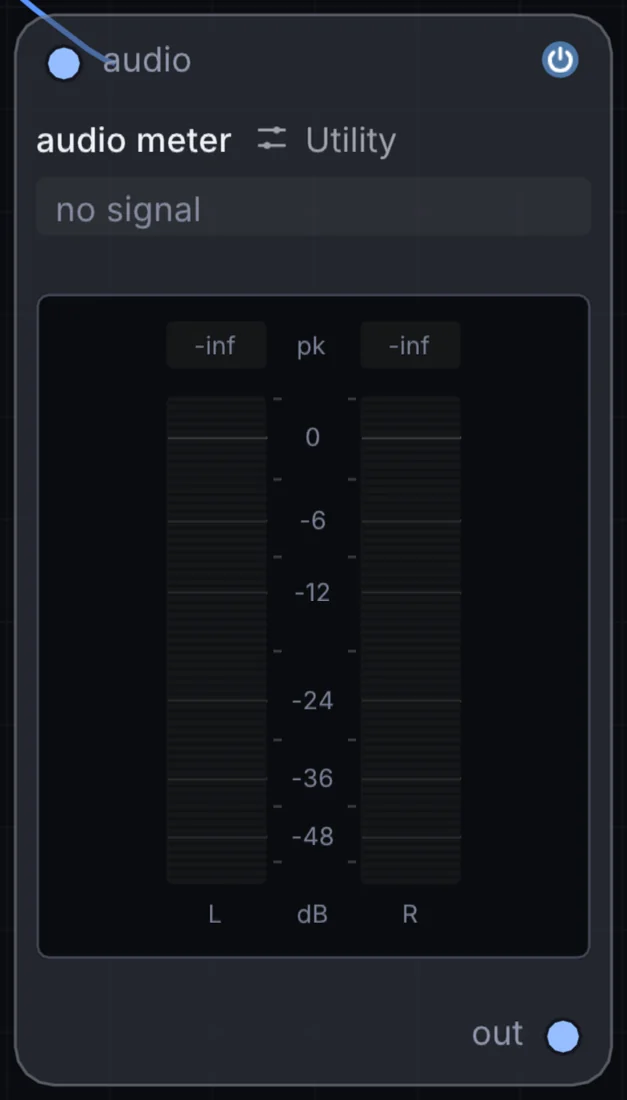
What it does
Audio Meter is a utility node: it routes signals in and out of Infinite or sets up the canvas. It takes audio in and gives audio out.
Try it
Hang one off the master cable to watch your headroom as you mix.
Audio FileAudio MeterAudio Out
Inputs and outputs
Inputs
- audio audio
Outputs
- audio out
Example patch
This patch wires Audio Meter to what it needs and shows the result. Download it, then use File, Open in Infinite, or read it here: it is plain text.
infinite-patch 1
rev 2
# Audio Meter: a starting patch for the Audio Meter node
node 1 Utility Audio Meter
  id node
  pos 520 300
end
node 2 Synths Oscillator
  id in0
  pos 0 300
end
node 3 Utility Audio Out
  id speakers
  pos 1080 300
end
aud node 0 in0
aud speakers 0 node