
Modulators node
Image Analyze
The visual mirror of Audio Analyze — reads brightness, color channels, saturation, hue, motion, and where the action is happening on screen, turning all of it into modulation.
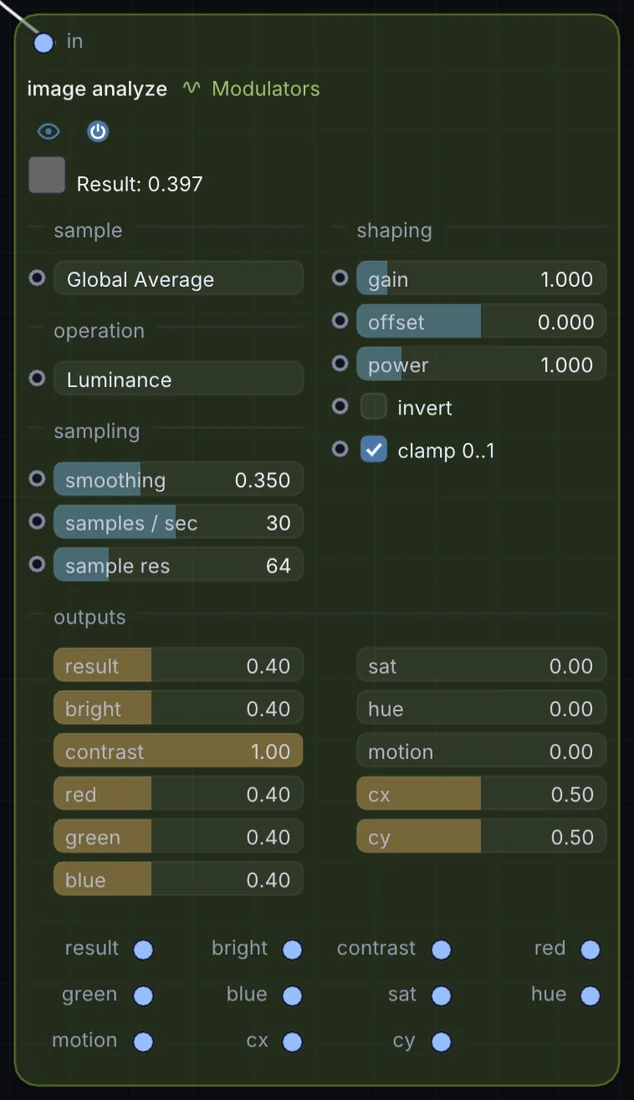
What it does
Image Analyze is a modulator: it makes a moving value that can drive any control on the canvas. It takes picture in and gives control signal out.
Try it
Drive a synth's pitch or filter straight from webcam motion for a fully vision-controlled instrument.
WebcamImage Analyze (Motion)Synth Pitch/Filter
Inputs and outputs
Inputs
- picture input
Outputs
- control signal result
- control signal bright
- control signal contrast
- control signal red
- control signal green
- control signal blue
- control signal sat
- control signal hue
- control signal motion
- control signal cx
- control signal cy
Controls
Every control with a range can be driven by a modulator, a note, an audio level or a sketch.
| Control | Range or options | Default |
|---|---|---|
| sample mode | Global Average, Point Probe, Region of Interest, Center Weighted | 0 |
| operation | Custom Expression, Red, Green, Blue, Alpha, Luminance, Average, Sum … | 5 |
| gain | 0 to 8 | 1 |
| offset | -1 to 1 | 0 |
| power | 0.1 to 5 | 1 |
| invert | on or off | off |
| clamp 0..1 | on or off | on |
| smoothing | 0 to 0.99 | 0.349999994 |
| samples / sec | 1 to 60 | 30 |
| sample res | 8 to 256 | 64 |
Example patch
This patch wires Image Analyze to what it needs and shows the result. Download it, then use File, Open in Infinite, or read it here: it is plain text.
infinite-patch 1
rev 2
# Image Analyze: a starting patch for the Image Analyze node
node 1 Modulators Image Analyze
  id node
  pos 520 300
end
node 2 Source Ramp
  id in0
  pos 0 300
end
node 3 Source Shape
  id shape
  pos 1080 300
end
node 4 Utility Output
  id out
  pos 1640 300
end
cable node 0 in0
mod shape sizeX node 0 0 0.6 0.5
cable out 0 shape