
Modulators node
Palette
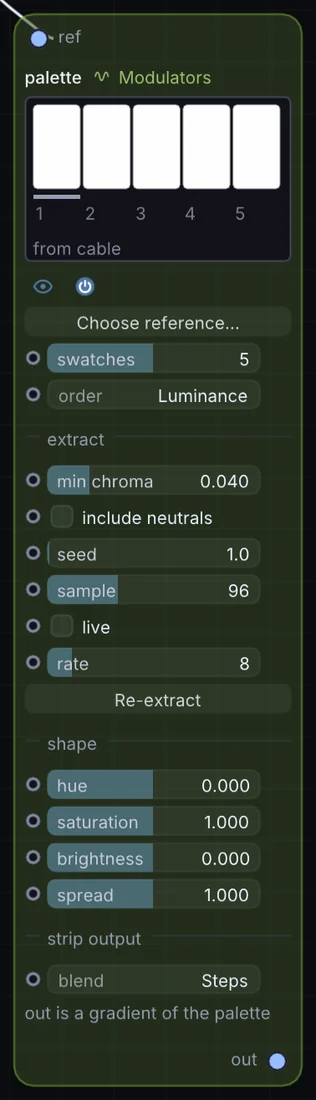
Extracts a small color palette from a reference image or live video, clustering colors in Oklab space with sort, chroma, and mood-shaping controls (hue shift, saturation, brightness).
What it does
Palette is a modulator: it makes a moving value that can drive any control on the canvas. It takes picture in and gives colour palette out.
Try it
Feed in a still-life photo and pipe its palette into every Ramp and material color in the patch for one cohesive mood.
Palette (image)Ramp / Material Color
Inputs and outputs
Inputs
- picture ref
Outputs
- colour palette out
Controls
Every control with a range can be driven by a modulator, a note, an audio level or a sketch.
| Control | Range or options | Default |
|---|---|---|
| swatches | 2 to 8 | 5 |
| order | Luminance, Weight, Hue | 0 |
| blend | Steps, Smooth | 0 |
| min chroma | 0 to 0.2 | 0.0399999991 |
| include neutrals | on or off | off |
| hue | -0.5 to 0.5 | 0 |
| saturation | 0 to 2 | 1 |
| brightness | -0.4 to 0.4 | 0 |
| spread | 0 to 2 | 1 |
| live | on or off | off |
| rate | 1 to 60 | 8 |
| sample | 16 to 256 | 96 |
| seed | 0 to 64 | 1 |
Example patch
This patch wires Palette to what it needs and shows the result. Download it, then use File, Open in Infinite, or read it here: it is plain text.
infinite-patch 1
rev 2
# Palette: a starting patch for the Palette node
node 1 Modulators Palette
  id node
  pos 520 300
end
node 2 Source Ramp
  id in0
  pos 0 300
end
node 3 Source Shape
  id shape
  pos 1080 300
end
node 4 Utility Output
  id out
  pos 1640 300
end
cable node 0 in0
pal shape 0 node 0
cable out 0 shape