
Notes node
Piano Roll
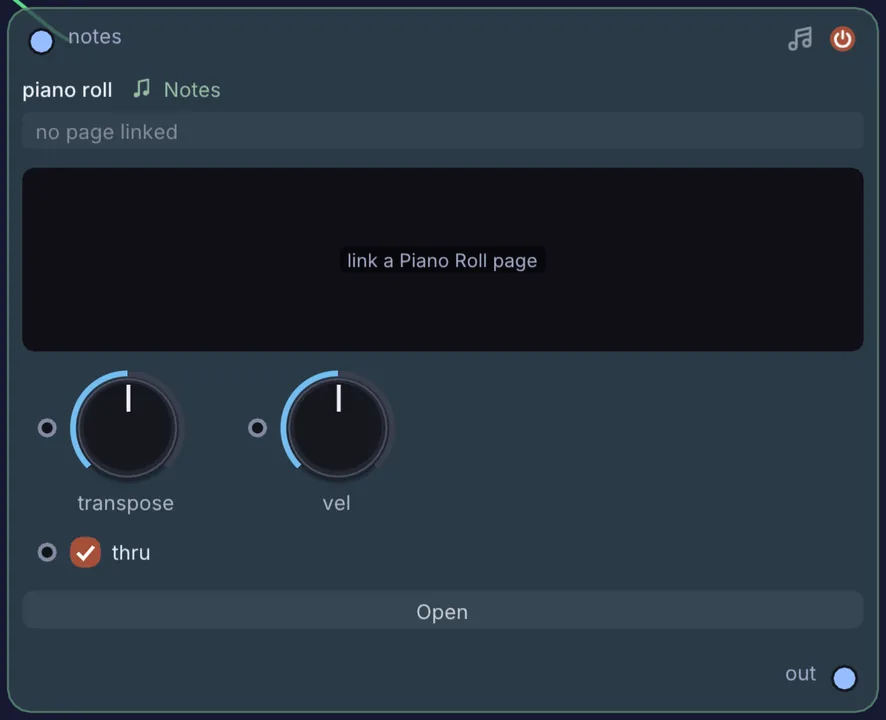
Plays the notes of a Piano Roll page linked to it: a MIDI lane in the Timeline, drawn as clips you can cut and loop like any other clip. It follows the transport, plays each clip as drawn (loops unrolled, chance rolled fresh on every play), and sends pitch bend, pressure and timbre curves with its notes. Transpose (-48 to 48 semitones) and Velocity (0 to 2) act on everything it plays. Its notes input passes through and merges in unless Thru is off. Global Scale snaps every played note to the project key and scale. Everyday use: a drawn MIDI melody or chord progression you can loop and transpose. Also called a MIDI clip or a note sequencer.
What it does
Piano Roll is a note node: it makes, filters or changes notes before a synth plays them. It takes notes in and gives notes out.
Try it
Draw a four-bar melody, set Transpose to +7 and route it into Wavetable for a fifth-up copy.
Inputs and outputs
Inputs
- notes notes
Outputs
- notes out
Controls
Every control with a range can be driven by a modulator, a note, an audio level or a sketch.
| Control | Range or options | Default |
|---|---|---|
| transpose | -48 to 48 | 0 |
| vel | 0 to 2 | 1 |
| thru | on or off | on |
Example patch
This patch wires Piano Roll to what it needs and shows the result. Download it, then use File, Open in Infinite, or read it here: it is plain text.
infinite-patch 1
rev 2
# Piano Roll: a starting patch for the Piano Roll node
node 1 Notes Piano Roll
  id node
  pos 520 300
end
node 2 Notes Random Note Generator
  id in0
  pos 0 300
end
node 3 Synths Analog
  id voice
  pos 1080 300
end
node 4 Utility Audio Out
  id speakers
  pos 1640 300
end
note node 0 in0
note voice 0 node
aud speakers 0 voice