
Source node
Text
Renders crisp type using any font installed on your Mac via CoreText — titles, lyrics, captions. Alignment, size, and letter spacing are all adjustable live.
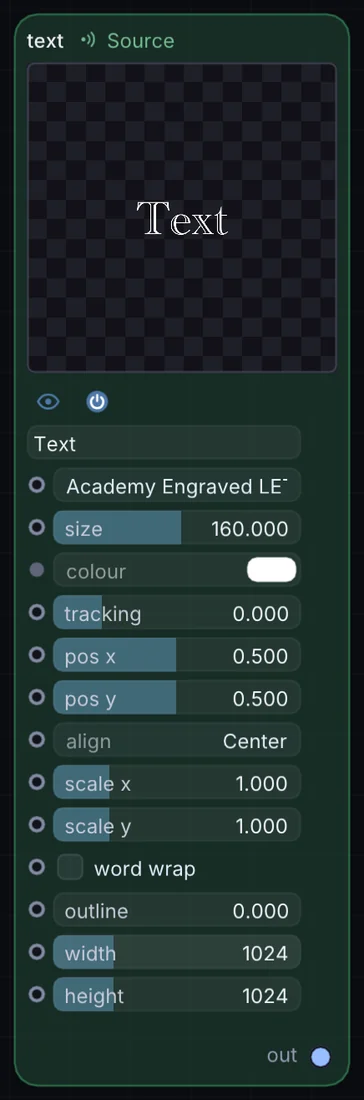
What it does
Text is a source node: it makes a picture from nothing, so it sits at the start of a visual chain. It has no input and gives picture out, so it starts a chain.
Try it
Drop a title at the top of your Layer Stack and hit it with Bloom for a glowing lower-third.
Inputs and outputs
Inputs
- None. It starts a chain.
Outputs
- picture out
Controls
Every control with a range can be driven by a modulator, a note, an audio level or a sketch.
| Control | Range or options | Default |
|---|---|---|
| size | 8 to 300 | 160 |
| tracking | -10 to 40 | 0 |
| pos x | 0 to 1 | 0.5 |
| pos y | 0 to 1 | 0.5 |
| align | Left, Center, Right, Justified | 1 |
| scale x | 0.1 to 4 | 1 |
| scale y | 0.1 to 4 | 1 |
| word wrap | on or off | off |
| outline | 0 to 20 | 0 |
| width | 16 to 4096 | 1024 |
| height | 16 to 4096 | 1024 |
Example patch
This patch wires Text to what it needs and shows the result. Download it, then use File, Open in Infinite, or read it here: it is plain text.
infinite-patch 1
rev 2
# Text: a starting patch for the Text node
node 1 Source Text
  id node
  pos 520 300
end
node 2 Utility Output
  id out
  pos 1080 300
end
cable out 0 node