
Source node
Draw
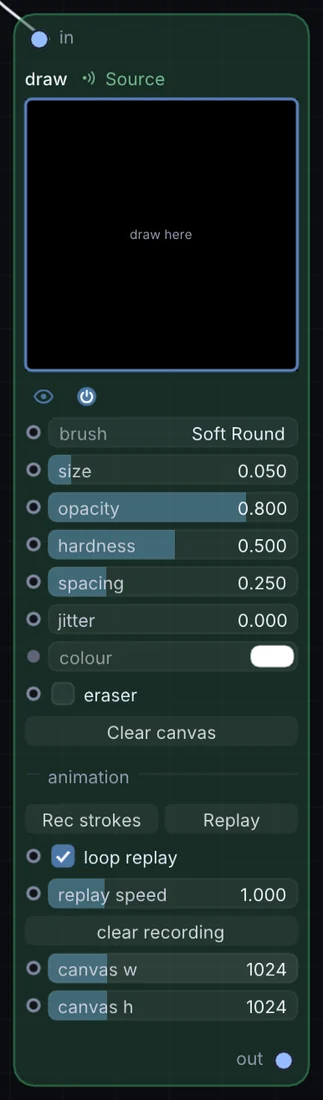
A live paint canvas right inside the node graph — soft round, hard round, square, spray, chalk, and ink-bleed brushes, plus a dedicated eraser toggle. Anything you paint becomes a texture the rest of the patch can use immediately.
What it does
Draw is a source node: it makes a picture from nothing, so it sits at the start of a visual chain. It takes picture in and gives picture out.
Try it
Paint a quick stroke and route it through Feedback so every mark trails and echoes forever.
Inputs and outputs
Inputs
- picture input
Outputs
- picture out
Controls
Every control with a range can be driven by a modulator, a note, an audio level or a sketch.
| Control | Range or options | Default |
|---|---|---|
| loop replay | on or off | on |
| replay speed | 0.1 to 4 | 1 |
| brush | Soft Round, Hard Round, Square, Spray, Chalk, Ink Bleed | 0 |
| size | 0.002 to 0.5 | 0.0500000007 |
| opacity | 0.02 to 1 | 0.800000012 |
| hardness | 0 to 0.98 | 0.5 |
| spacing | 0.02 to 1 | 0.25 |
| jitter | 0 to 2 | 0 |
| eraser | on or off | off |
| canvas w | 64 to 4096 | 1024 |
| canvas h | 64 to 4096 | 1024 |
Example patch
This patch wires Draw to what it needs and shows the result. Download it, then use File, Open in Infinite, or read it here: it is plain text.
infinite-patch 1
rev 2
# Draw: a starting patch for the Draw node
node 1 Source Draw
  id node
  pos 520 300
end
node 2 Source Ramp
  id in0
  pos 0 300
end
node 3 Utility Output
  id out
  pos 1080 300
end
cable node 0 in0
cable out 0 node