
Synths node
Equation Synth
A Desmos-style oscillator: type a formula like y = sin(x + a) and it renders that curve as an anti-aliased, polyphonic wavetable waveform, so turning knobs A through D actually reshapes the wave's math instead of just modulating a fixed one. A full voice sits behind it — unison, an amp envelope, and a resonant filter with its own envelope.
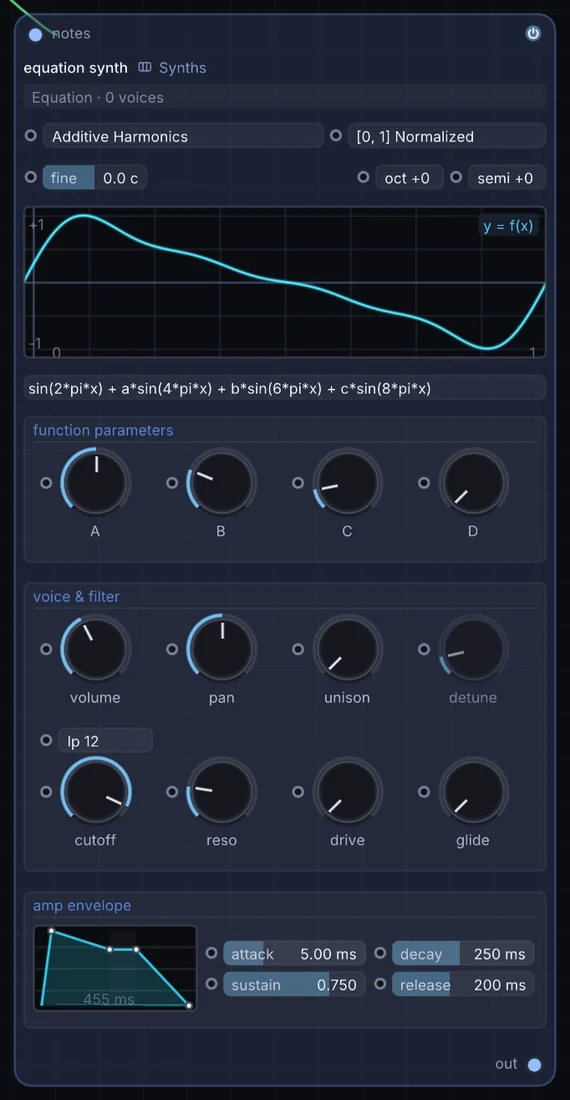
What it does
Equation Synth is a synth: it turns notes into sound. It takes notes in and gives audio out.
Try it
Start from a plain sine and add a small a * sin(x * 3) term for an instantly richer, custom waveform.
MIDI NotesEquation SynthReverb
Inputs and outputs
Inputs
- notes notes
Outputs
- audio out
Controls
Every control with a range can be driven by a modulator, a note, an audio level or a sketch.
| Control | Range or options | Default |
|---|---|---|
| eqPreset | Sine (Pure), Additive Harmonics, Chebyshev T3/T4/T5, Phase Distortion / FM, Sinc Pulse (Dirichlet), Exponential Chirp, Weierstrass Fractal, Tanh Soft Saturator … | 1 |
| eqDom | [0, 1] Normalized, [-pi, pi] Angular, [-1, 1] Bipolar | 0 |
| A | 0 to 1 | 0.5 |
| B | 0 to 1 | 0.25 |
| C | 0 to 1 | 0.125 |
| D | 0 to 1 | 0 |
| volume | 0 to 2 | 0.800000012 |
| pan | -1 to 1 | 0 |
| fine | -50 to 50 | 0 |
| glide | 0 to 1 | 0 |
| unison | 1 to 8 | 1 |
| detune | 0 to 100 | 12 |
| attack | 0 to 4000 | 5 |
| decay | 0 to 4000 | 250 |
| sustain | 0 to 1 | 0.75 |
| release | 0 to 4000 | 200 |
| eqFilter | off, lp 12, lp 24, lp 36, hp 12, hp 24, hp 36, bp 12 … | 1 |
| cutoff | 20 to 20000 | 12000 |
| reso | 0 to 1 | 0.200000003 |
| drive | 0 to 1 | 0 |
Example patch
This patch wires Equation Synth to what it needs and shows the result. Download it, then use File, Open in Infinite, or read it here: it is plain text.
infinite-patch 1
rev 2
# Equation Synth: a starting patch for the Equation Synth node
node 1 Synths Equation Synth
  id node
  pos 520 300
end
node 2 Notes Random Note Generator
  id in0
  pos 0 300
end
node 3 Utility Audio Out
  id speakers
  pos 1080 300
end
note node 0 in0
aud speakers 0 node