
3D node
Camera
Defines the viewpoint for Render 3D — perspective or orthographic, field of view, distance/azimuth/elevation orbit around a target, roll, and clip planes. An orbit-per-beat value spins the camera automatically for turntable shots.
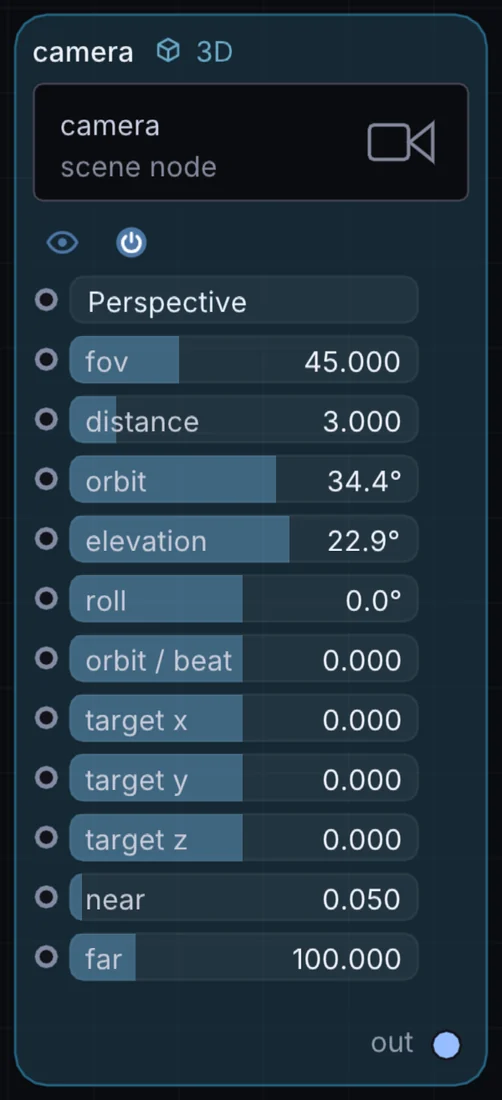
What it does
Camera is a 3D node: it builds, changes or lights geometry that Render 3D turns into a picture. It has no input and gives camera out, so it starts a chain.
Try it
Set orbit-per-beat to a nonzero value for an automatic slow turntable rotation, synced to the transport clock.
Inputs and outputs
Inputs
- None. It starts a chain.
Outputs
- camera out
Controls
Every control with a range can be driven by a modulator, a note, an audio level or a sketch.
| Control | Range or options | Default |
|---|---|---|
| projection | Perspective, Orthographic | 0 |
| fov | 10 to 120 | 45 |
| distance | 0.3 to 20 | 3 |
| orbit | -180 to 180 | 34.3774986 |
| elevation | -85.944 to 85.944 | 22.9183006 |
| target x | -3 to 3 | 0 |
| target y | -3 to 3 | 0 |
| target z | -3 to 3 | 0 |
| roll | -180 to 180 | 0 |
| near | 0.01 to 1 | 0.0500000007 |
| far | 5 to 500 | 100 |
| orbit / beat | -1 to 1 | 0 |
Example patch
This patch wires Camera to what it needs and shows the result. Download it, then use File, Open in Infinite, or read it here: it is plain text.
infinite-patch 1
rev 2
# Camera: a starting patch for the Camera node
node 1 3D Camera
  id node
  pos 520 300
end
node 2 3D Cube
  id box
  pos 1080 100
end
node 3 3D Render 3D
  id view
  pos 1080 300
end
node 4 Utility Output
  id out
  pos 1640 300
end
geo view 0 box
geo view 4 node
cable out 0 view