
Compositing node
Fit
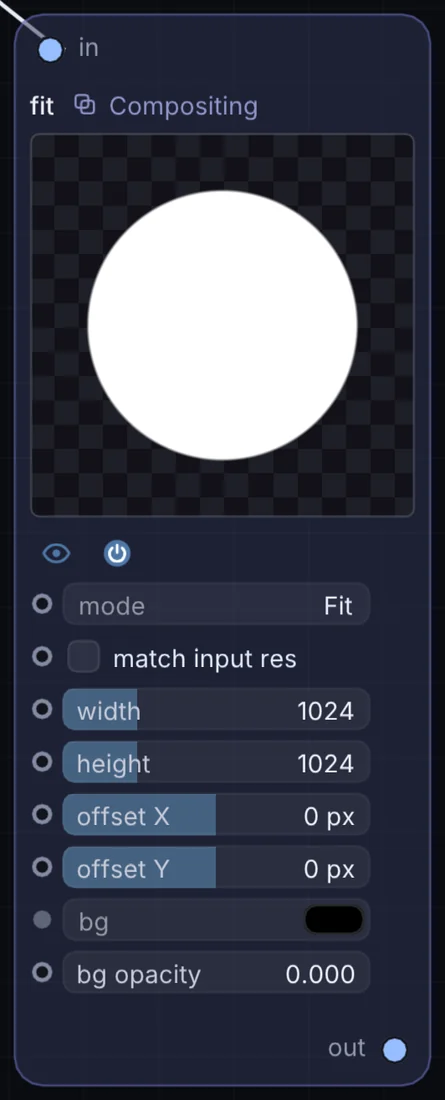
Resizes and reflows whatever image comes in to a target width and height, with a mode of Fit (letterbox), Fill (crop to fill), Stretch (ignore aspect ratio), or Native (pass through). A background color and opacity fill any letterboxed edges.
What it does
Fit is a compositing node: it layers, masks and routes pictures. It takes picture in and gives picture out.
Try it
Feed a portrait-shaped camera or image source into a square canvas using Fill mode so it crops to a clean center square.
Inputs and outputs
Inputs
- picture input
Outputs
- picture out
Controls
Every control with a range can be driven by a modulator, a note, an audio level or a sketch.
| Control | Range or options | Default |
|---|---|---|
| mode | Fit, Fill, Stretch, Native | 0 |
| width | 16 to 4096 | 1024 |
| height | 16 to 4096 | 1024 |
| match input res | on or off | off |
| offset X | -4096 to 4096 | 0 |
| offset Y | -4096 to 4096 | 0 |
| bg opacity | 0 to 1 | 0 |
Example patch
This patch wires Fit to what it needs and shows the result. Download it, then use File, Open in Infinite, or read it here: it is plain text.
infinite-patch 1
rev 2
# Fit: a starting patch for the Fit node
node 1 Compositing Fit
  id node
  pos 520 300
end
node 2 Source Ramp
  id in0
  pos 0 300
end
node 3 Utility Output
  id out
  pos 1080 300
end
cable node 0 in0
cable out 0 node