
3D node
Image to Points
Converts an image into a point cloud — one particle per sampled pixel on a density grid — with brightness pushing each point out of a flat plane by a depth amount, and darker pixels dropped entirely so a cutout image reads as a shape.
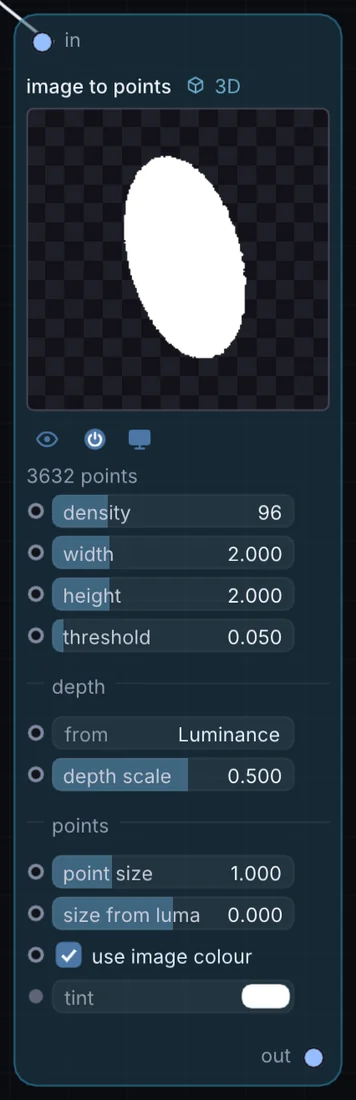
What it does
Image to Points is a 3D node: it builds, changes or lights geometry that Render 3D turns into a picture. It takes picture in and gives 3D shape out.
Try it
Feed a photo of a face in and instance small spheres on the points to build a pointillist 3D portrait.
ImageImage to PointsInstance on PointsRender 3D
Inputs and outputs
Inputs
- picture input
Outputs
- 3D shape out
Controls
Every control with a range can be driven by a modulator, a note, an audio level or a sketch.
| Control | Range or options | Default |
|---|---|---|
| density | 4 to 400 | 96 |
| width | 0.1 to 8 | 2 |
| height | 0.1 to 8 | 2 |
| from | Luminance, Red, Alpha, Flat | 0 |
| depth scale | -4 to 4 | 0.5 |
| point size | 0.01 to 4 | 1 |
| threshold | 0 to 1 | 0.0500000007 |
| use image colour | on or off | on |
| size from luma | -1 to 1 | 0 |
Example patch
This patch wires Image to Points to what it needs and shows the result. Download it, then use File, Open in Infinite, or read it here: it is plain text.
infinite-patch 1
rev 2
# Image to Points: a starting patch for the Image to Points node
node 1 3D Image to Points
  id node
  pos 520 300
end
node 2 Source Ramp
  id in0
  pos 0 300
end
node 3 3D Render 3D
  id view
  pos 1080 300
end
node 4 Utility Output
  id out
  pos 1640 300
end
cable node 0 in0
geo view 0 node
cable out 0 view