
3D node
Resynthesize 3D
The 3D counterpart to the image Resynth node — each generation mutates the previous generation, not the original input, so the mesh drifts progressively over time via displace, jitter, smooth, twist, bulge, extrude, subdivide, and squash operators.
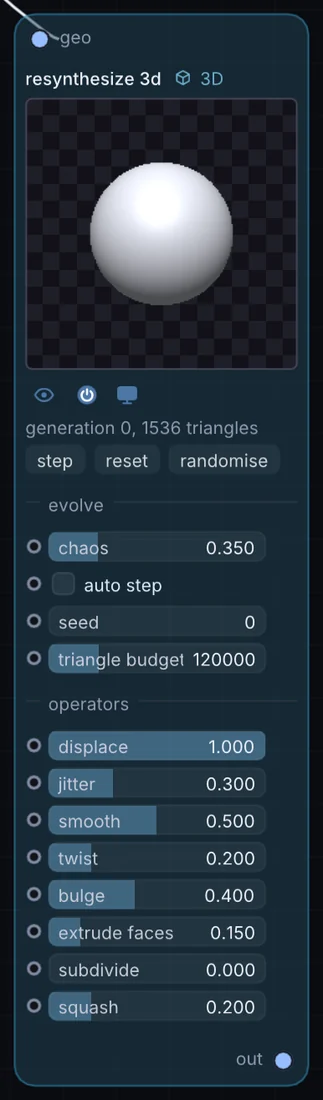
What it does
Resynthesize 3D is a 3D node: it builds, changes or lights geometry that Render 3D turns into a picture. It takes 3D shape in and gives 3D shape out.
Try it
Set a high displace weight and low smooth weight, then auto-step it to slowly grow an organic, coral-like form from a simple starting mesh.
IcosphereResynthesize 3DRender 3D
Inputs and outputs
Inputs
- 3D shape geo
Outputs
- 3D shape out
Controls
Every control with a range can be driven by a modulator, a note, an audio level or a sketch.
| Control | Range or options | Default |
|---|---|---|
| displace | 0 to 1 | 1 |
| jitter | 0 to 1 | 0.300000012 |
| smooth | 0 to 1 | 0.5 |
| twist | 0 to 1 | 0.200000003 |
| bulge | 0 to 1 | 0.400000006 |
| extrude faces | 0 to 1 | 0.150000006 |
| subdivide | 0 to 1 | 0 |
| squash | 0 to 1 | 0.200000003 |
| chaos | 0 to 1.5 | 0.349999994 |
| seed | 0 to 1000 | 0 |
| auto step | on or off | off |
| triangle budget | 2000 to 500000 | 120000 |
Example patch
This patch wires Resynthesize 3D to what it needs and shows the result. Download it, then use File, Open in Infinite, or read it here: it is plain text.
infinite-patch 1
rev 2
# Resynthesize 3D: a starting patch for the Resynthesize 3D node
node 1 3D Resynthesize 3D
  id node
  pos 520 300
end
node 2 3D Cube
  id in0
  pos 0 300
end
node 3 3D Render 3D
  id view
  pos 1080 300
end
node 4 Utility Output
  id out
  pos 1640 300
end
geo node 0 in0
geo view 0 node
cable out 0 view