
3D node
Curve
Generates a spline that works two ways: as visible tube geometry (adjustable radius, sides, taper) and as a path other nodes can follow. Builds from up to 8 control points using Catmull-Rom, Bezier, B-spline, or linear interpolation, closeable into a loop.
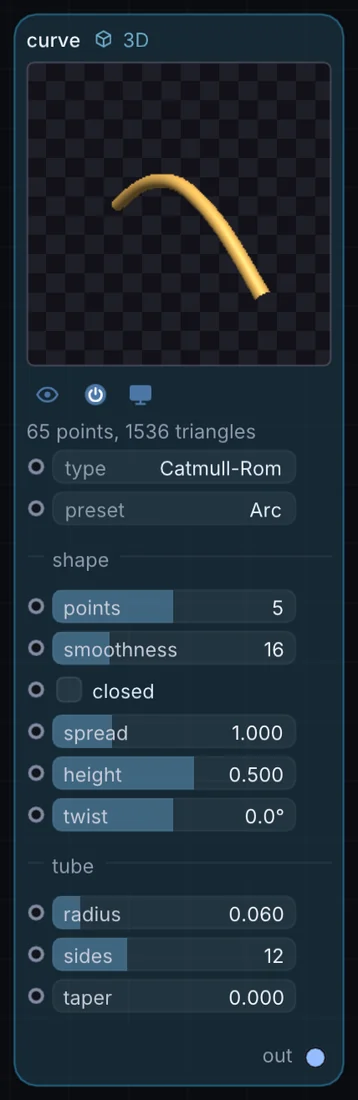
What it does
Curve is a 3D node: it builds, changes or lights geometry that Render 3D turns into a picture. It has no input and gives 3D shape out, so it starts a chain.
Try it
Set it to a closed loop and route a Path-follower along it to fly a camera or object in a continuous circuit.
Inputs and outputs
Inputs
- None. It starts a chain.
Outputs
- 3D shape out
Controls
Every control with a range can be driven by a modulator, a note, an audio level or a sketch.
| Control | Range or options | Default |
|---|---|---|
| type | Catmull-Rom, Bezier, B-Spline, Linear | 0 |
| preset | Arc, Spiral, Wave, Scatter, Circle | 0 |
| points | 2 to 8 | 5 |
| smoothness | 1 to 64 | 16 |
| closed | on or off | off |
| spread | 0 to 4 | 1 |
| height | -3 to 3 | 0.5 |
| twist | -180 to 180 | 0 |
| radius | 0 to 0.5 | 0.0599999987 |
| sides | 3 to 32 | 12 |
| taper | 0 to 1 | 0 |
Example patch
This patch wires Curve to what it needs and shows the result. Download it, then use File, Open in Infinite, or read it here: it is plain text.
infinite-patch 1
rev 2
# Curve: a starting patch for the Curve node
node 1 3D Curve
  id node
  pos 520 300
end
node 2 3D Render 3D
  id view
  pos 1080 300
end
node 3 Utility Output
  id out
  pos 1640 300
end
geo view 0 node
cable out 0 view