
3D node
Wrap
Conforms one mesh onto the surface of another — every source vertex moves to the nearest point on the target's surface, real shrinkwrap-style deformation. Offers Cylindrical, Spherical, and Nearest Surface modes plus a bend radius and blend amount.
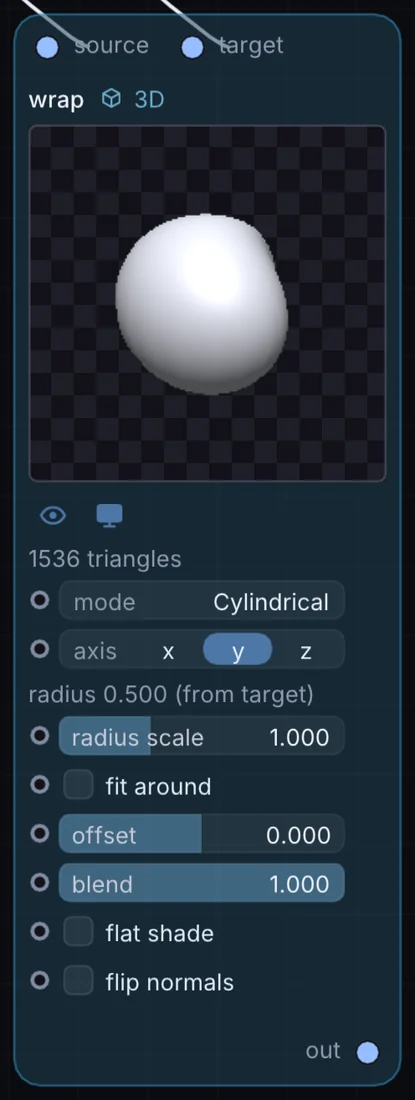
What it does
Wrap is a 3D node: it builds, changes or lights geometry that Render 3D turns into a picture. It takes 3D shape in and gives 3D shape out.
Try it
Wrap a flat text mesh cylindrically around a bottle-shaped target so the text reads as if printed on the label.
Text 3D + Geometry (target)WrapRender 3D
Inputs and outputs
Inputs
- 3D shape source
- 3D shape target
Outputs
- 3D shape out
Controls
Every control with a range can be driven by a modulator, a note, an audio level or a sketch.
| Control | Range or options | Default |
|---|---|---|
| mode | Cylindrical, Spherical, Nearest Surface | 0 |
| axis | x, y, z | 1 |
| radius | 0.05 to 5 | 1 |
| fit around | on or off | off |
| offset | -0.5 to 0.5 | 0 |
| blend | 0 to 1 | 1 |
| flat shade | on or off | off |
| flip normals | on or off | off |
Example patch
This patch wires Wrap to what it needs and shows the result. Download it, then use File, Open in Infinite, or read it here: it is plain text.
infinite-patch 1
rev 2
# Wrap: a starting patch for the Wrap node
node 1 3D Wrap
  id node
  pos 520 300
end
node 2 3D Cube
  id in0
  pos 0 220
end
node 3 3D Cube
  id in1
  pos 0 510
end
node 4 3D Render 3D
  id view
  pos 1080 300
end
node 5 Utility Output
  id out
  pos 1640 300
end
geo node 0 in0
geo node 1 in1
geo view 0 node
cable out 0 view