
3D node
Audio Displacement
Deforms a mesh in real time from live audio, with five modes: waveform push, FFT-spectrum warp, concentric ripples, Chladni-plate standing-wave patterns, or a straight axis push. Includes attack/decay smoothing and a real-time subdivision level.
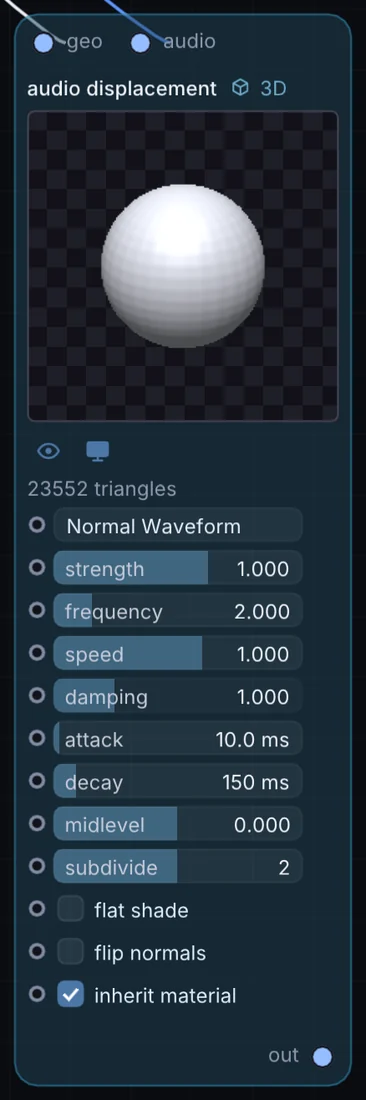
What it does
Audio Displacement is a 3D node: it builds, changes or lights geometry that Render 3D turns into a picture. It takes 3D shape and audio in and gives 3D shape out.
Try it
Patch a kick-drum track in using Acoustic Ripples mode to make a sphere pulse outward on every hit.
Audio InAudio Displacement (geo: Sphere)Render 3D
Inputs and outputs
Inputs
- 3D shape geo
- audio audio
Outputs
- 3D shape out
Controls
Every control with a range can be driven by a modulator, a note, an audio level or a sketch.
| Control | Range or options | Default |
|---|---|---|
| mode | Normal Waveform, Spectral FFT Bands, Acoustic Ripples, Cymatics (Chladni), Directional Axis | 0 |
| strength | -4 to 4 | 1 |
| frequency | 0.1 to 12 | 2 |
| speed | -5 to 5 | 1 |
| damping | 0 to 4 | 1 |
| attack | 1 to 300 | 10 |
| decay | 10 to 1500 | 150 |
| midlevel | -1 to 1 | 0 |
| subdivide | 0 to 4 | 2 |
| flat shade | on or off | off |
| flip normals | on or off | off |
| inherit material | on or off | on |
Example patch
This patch wires Audio Displacement to what it needs and shows the result. Download it, then use File, Open in Infinite, or read it here: it is plain text.
infinite-patch 1
rev 2
# Audio Displacement: a starting patch for the Audio Displacement node
node 1 3D Audio Displacement
  id node
  pos 520 300
end
node 2 3D Cube
  id in0
  pos 0 220
end
node 3 Synths Oscillator
  id in1
  pos 0 510
end
node 4 3D Render 3D
  id view
  pos 1080 300
end
node 5 Utility Output
  id out
  pos 1640 300
end
geo node 0 in0
aud node 1 in1
geo view 0 node
cable out 0 view